
Software for Surgeons
Pre-op notes in the OPD, the surgery record, post-op ward charts and the discharge summary, in one patient file.
- Drain output and fluid balance calculated
- IV fluids on the pump fill the chart
- Discharge summary from the stay record
15-minute demo on your own post-op charts.
| 10:00 | 11:00 | 12:00 | Total fx | |
|---|---|---|---|---|
| IV (pump) | 100 | 100 | 100 | 300 |
| Total intake | 100 | 100 | 100 | 300 |
| Urine | 80 | — | 70 | 150 |
| Drain | 30 | — | 20 | 50 |
| RT aspirate | — | 50 | — | 50 |
| Total output | 110 | 50 | 90 | 250 |
| Balance | −10 | +50 | +10 | +50 |
Explain it. Show the healing.
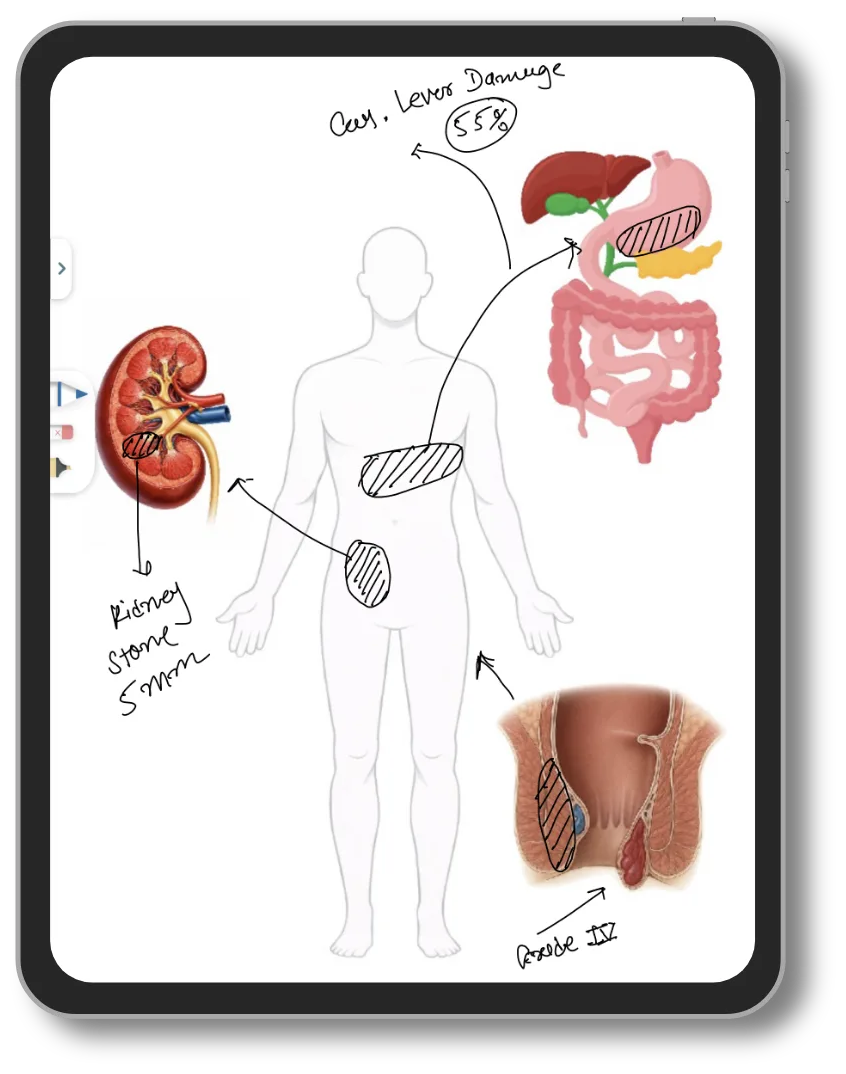
Explain the operation
Draw on the anatomy image while the patient and family watch.
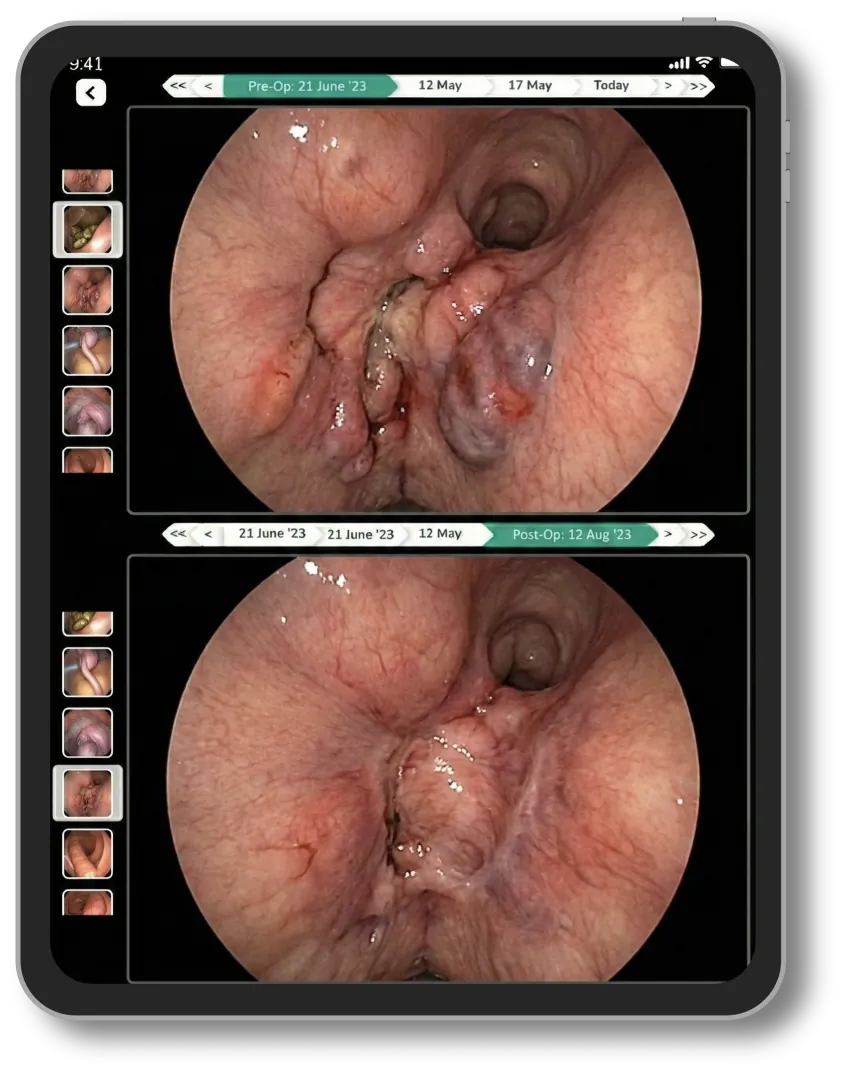
Before and after, side by side
Pre-op and post-op images from two visits on one screen.
Surgical charts, ready on day one
Set up for your hospital before you start. Change any chart to match your protocol.
OPD
- Pre-op assessment
- Surgical history
- Your own custom forms
- Pre-op and post-op images
Ward
- Surgery record
- Treatment sheet
- Input/Output & drain
- Infusion pump
- Vital sheet
- Continuity sheet (rounds)
- Nursing notes
- Nursing care
- Catheter insertion sheet
- Investigation sheet
- Discharge summary
Post-op orders
Every order, given on time
Each post-op order shows its set time, actual time and status. Doses given reach the intake chart and the bill.
- Set time and actual time
- Start, edit or copy an order
- Entry log on every change
Discharge
Discharge summary in one click
Treatment given and the latest vitals copy into the discharge summary with the surgery notes. You review and sign.
- Surgery notes included
- Medicines and vitals copied in
- Prints on your letterhead
- Inj. Ceftriaxone 1 g
IV · 1-0-1 · 5 days - Inj. Pantoprazole 80 mg infusion
10 ml/hr · 3 days - Tab. Paracetamol 650 mg
SOS · 3 days
SpO2 98%Pulse 78/minBP 124/80RR 16/minTemp 98.4 °F
OPD
Pre-op notes in your handwriting
Write the pre-op notes and advice with a pen on the tablet. Past surgeries and reports open in one tap.
- Pen, typing or voice
- Past reports in the same file
- Prescription on WhatsApp
| Type | Drug Name | Dosage | When | Frequency | Duration | Qty. |
|---|---|---|---|---|---|---|
| TAB. | Paracetamol 650 mg | 1-0-1 | After Food | Daily | 3 Days | 6 |
| TAB. | Cetirizine 10 mg | 0-0-1 | After Food | Daily | 5 Days | 5 |
| SYP. | Ambroxol 30 mg/5 ml | 5 ml 1-1-1 | After Food | Daily | 5 Days | 1 |
Your prescription pad, on a tablet

Write with a pen
Write on the tablet as you do on paper. It saves as a digital prescription.
Tablet writing →| Medicine | Dose | Days |
|---|---|---|
| Tab. Metformin 500 mg | 1-0-1 | 30 |
| Tab. Telmisartan 40 mg | 1-0-0 | 30 |
| Tab. Atorvastatin 10 mg | 0-0-1 | 30 |
Type on the computer
Add medicines from your templates, or load the last prescription and edit.
EMR software →Speak to LaMa AI
Speak in English, Hindi or your language. Check the prescription, then save.
Voice prescriptions →What changes
- Today: Drain output added up on the ward sheetWith Lifemaan: Drain and fluid balance calculated hour by hour
- Today: IV fluids counted from the bottleWith Lifemaan: Pump rate fills the hourly intake
- Today: Post-op orders on loose sheetsWith Lifemaan: Each order with set time, actual time and status
- Today: Discharge summary typed from the case fileWith Lifemaan: Treatment and vitals copied in one click
- Today: Patient forgets the old reportsWith Lifemaan: Every report and image in the patient file
- Today: Surgery charges collected at dischargeWith Lifemaan: Surgery, rounds and medicines on the IPD bill
Rest of the hospital
What Surgeons Say
“This is the best app for busy doctors like me. Writing on Tablet is so effortless, I am 100% satisfied with Lifemaan's platform.”

Dr. Nirav Satasiya
MS (General Surgery), Laparoscopic & Endoscopic Surgeon, Satasiya Surgical Hospital, Junagadh
See it with your own surgical charts
Quote-based pricing, with a free trial.
- Your specialty's charts, shown on a real patient file
- Bring one paper chart you use; we show it in Lifemaan
- 15 minutes, on video call or at your clinic
Or reach us directly: +91 90237 53539 · WhatsApp