
Digital Tablet Writing
Write Like Paper. Store Like Software.
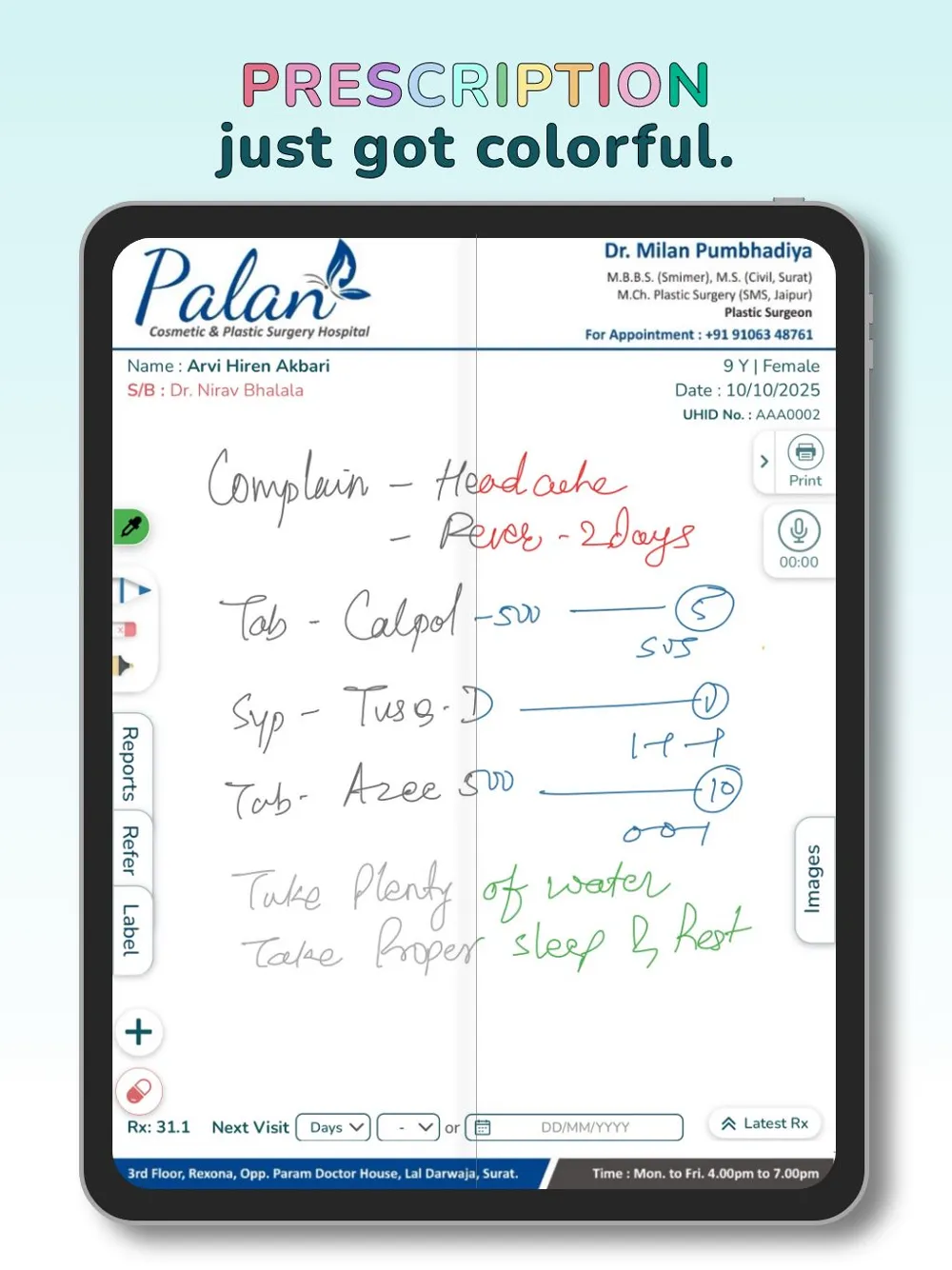
Pick up the pen. Write your prescription on the tablet — same handwriting, same speed, same style. Lifemaan captures and stores it as a structured digital record against the patient file. Works on all iPads with Apple Pencil and Samsung tablets with S Pen support.
Lifemaan's tablet writing feature lets Indian doctors write prescriptions on a tablet using a stylus — the handwritten prescription is captured and stored as a structured digital record against the patient file. It runs on all iPads with Apple Pencil and all Samsung tablets that support the S Pen. ABDM compliant and used across 328+ hospitals in India.
Last updated: May 2026
Why Do Doctors Prefer Tablet Writing Over Typing?
Zero learning curve
If you can write on paper, you can use this. Most doctors are productive in 5 minutes.
No per-page cost
Buy the tablet once. Write unlimited prescriptions — no recurring per-prescription charges.
Works for every specialty
Anatomical markings, surgical sketches, dental diagrams, prescription lists — the tablet captures everything.
ABDM-linked records
Prescriptions are stored against the patient file and can be shared with the patient under their consent through the ABDM ecosystem.
How Does Tablet Prescription Writing Work?
Write Naturally
Your handwriting, your style, your speed. Just write with the stylus on the tablet.
Captured to Patient File
Lifemaan captures the handwritten prescription and saves it as a structured digital record against the patient.
Send & Store
Prescription stored in patient record. Sent via WhatsApp or printed as needed.
What Can You Do With Lifemaan Tablet Writing?
Natural Handwriting
Write exactly like paper. Your handwriting, your diagrams, your style — no template-fighting.
Diagram Support
Sketch anatomy, surgical markings, or dental charts inline with the prescription.
Linked to Patient Record
Every prescription is auto-linked to the patient and visible in their history.
WhatsApp Delivery
Send the digitised prescription to the patient on WhatsApp in one tap.
Patient Education
Show specialty anatomy images on the tablet during the consultation to help patients understand.
Works With Speech-to-Rx
Dictate the body of the prescription with voice, then sign or annotate on the tablet — combine both methods on the same Rx.
Who Benefits From Tablet Writing?
Explore More
Speech-to-Rx
Dictate prescriptions in any of the 22 major Indian languages, plus English and Hinglish — the AI structures the output.
Learn moreEMR Software
Tablet-written prescriptions sit inside the patient's longitudinal EMR — one record across visits.
Learn moreHospital Management Software
Tablet writing is one part of the full Lifemaan HMS — OPD, IPD, billing, pharmacy, and more.
Learn moreFrequently Asked Questions
How Tablet Writing Works in Lifemaan
A doctor opens the patient record inside Lifemaan on the tablet, picks up the stylus, and writes the prescription the way they would on a paper pad. Lifemaan captures the strokes, preserves the handwriting, and stores the resulting prescription as a structured digital record attached to that patient's file. The record sits inside the patient's longitudinal history, so the prescription written today is visible alongside every past visit when the patient comes back next month.
Pen on tablet
Doctor writes naturally with the stylus on the patient record — same grip, same angle, same speed as paper.
Strokes captured
Lifemaan captures every stroke and preserves the original handwriting in the prescription.
Stored to patient file
Saved as a structured digital record attached to the patient — visible alongside every past visit.
The interaction is intentionally close to paper. The doctor's grip, the angle, the speed of writing, and the way they format the prescription stay the same. No template forces them to fill fields in a certain order. No keyboard slows them down. The clinical decision is made the same way it was made on paper — the only difference is that the output is digital from the moment the pen lifts off the tablet.
For doctors who prefer to dictate, the same prescription screen also accepts Speech-to-Rx voice dictation in all 22 major Indian languages plus English and Hinglish. Tablet writing and voice work together on the same Rx — they are input methods, not separate workflows. Computer-based typing with template selection is also supported for doctors who prefer the keyboard.
Which Tablets Does Lifemaan Support?
Lifemaan tablet writing runs on:
All iPads with Apple Pencil
Any iPad model that supports Apple Pencil works for tablet writing, including the iPad, iPad mini, iPad Air, and iPad Pro lines.
All Samsung tablets that support the S Pen
The Galaxy Tab S series with S Pen support, and the Galaxy Tab Active line all work with Lifemaan tablet writing.
Other Android tablets with stylus support
Most High End Android tablets with active stylus support also work. For a specific model, confirm with the Lifemaan sales team before purchasing.
Doctors and clinics that already own a tablet usually do not need to buy new hardware. For a clinic that is just starting out, the Lifemaan team will recommend a sensible tablet model during the demo based on the clinic's patient volume, specialty, and budget. The doctor app — Heroes of Lifemaan — is available on Google Play and the Apple App Store.
How a Doctor Writes a Prescription on Lifemaan Tablet
A walkthrough of a typical OPD consultation using tablet writing:
- 1.Open the patient record. The next patient from the OPD queue is selected on the tablet — either tapped from the live queue or scanned from the token slip. Past visits, vitals, allergies, and the previous prescription appear instantly. The doctor does not have to scroll through paper files or ask the patient to recall their last medication.
- 2.Write the prescription with the stylus. Pick up the Apple Pencil or S Pen and write the prescription on the tablet — diagnosis, medicines, dosages, instructions, and any diagram or anatomical marking. The handwriting stays exactly as the doctor wrote it; no recognition layer rewrites it into a different format. Diagrams sit alongside the medicine list rather than being squeezed into a separate field.
- 3.Save to the patient record. Tap save. Lifemaan captures the handwritten prescription as a structured record against the patient file. The prescription is now part of the longitudinal EMR and visible to any authorised consultant who opens this patient's file later — at this clinic or via ABDM if the patient is seen elsewhere.
- 4.Patient receives a digital copy. The prescription is sent to the patient on WhatsApp on the registered number — the patient does not need to download any app to receive it. A paper print is also available at the OPD counter for patients who prefer a hard copy or who need to carry it to a pharmacy without smartphone access.
What Tablet Writing Looks Like in a Busy Specialty OPD
A dental clinic with two operatories and a high-volume outpatient day is one of the cleanest demonstrations of why tablet writing matters. The dental consultant's prescription is rarely just a medicine list — it includes a dental chart with markings on specific teeth, the procedure done, the medications, and the recall instructions. A typing-only HMS interface struggles with the chart portion; the doctor ends up writing it on paper anyway and stapling a scan to the digital record. With tablet writing, the consultant marks the affected teeth directly on the chart with the stylus, writes the medication list below it, and saves the whole thing as one prescription. The patient receives the marked chart on WhatsApp and a copy is filed against the patient record for the next recall visit.
The same pattern shows up in dermatology, ENT, and orthopedics — anywhere the prescription has a visual element. Tablet writing makes these specialty workflows possible without forcing the doctor out of the digital record.
Orthopedics
The consultant draws an arrow on the limb outline showing the area of pain or the planned surgical approach.
Dermatology
Lesion locations are marked on a body diagram so the next visit's comparison is exact.
ENT
The post-op care diagram is drawn fresh for each patient.
Paper vs Typing into HMS vs Lifemaan Tablet Writing
Indian doctors have three practical options for writing prescriptions today: keep using paper, type into a traditional HMS interface, or write on a tablet with Lifemaan. The tradeoffs are different on each axis.
| Aspect | Paper | Typing into HMS | Lifemaan Tablet |
|---|---|---|---|
| Learning curve | None | Days to weeks | ~5 minutes |
| Speed for the doctor | Native handwriting speed | Slower than handwriting | Native handwriting speed |
| Diagrams and markings | Yes | No / awkward | Yes — drawn with stylus |
| Searchable patient history | No | Yes | Yes |
| Per-page cost over time | Recurring paper + print cost | No paper cost | No per-page cost |
| Template fighting | No | Yes | No |
The honest comparison is that paper is easy on the doctor but leaves no searchable record. Typing into a traditional HMS captures the record but slows the doctor down and forces them to format prescriptions inside someone else's template. Lifemaan's tablet writing keeps the speed and freedom of paper while producing a structured digital record at the end — without the template fight.
Which Specialties Get the Most Out of Tablet Writing
The doctors who get the most immediate value out of tablet writing are the ones whose prescriptions include a visual element.
Dental
Mark affected teeth on the chart, add procedure notes, and write the recall date all on the same page — without splitting the chart into a separate scanned attachment.
Dermatology
Mark lesion locations on a body diagram so the next visit's comparison is exact rather than approximate.
ENT
Draw post-op care diagrams for septoplasty, tympanoplasty, or sinus surgery patients.
Orthopedics
Sketch on limb diagrams to show the painful area, the planned surgical approach, or the post-rehabilitation exercise pattern.
Plastic surgery
Mark surgical planning lines directly on body outlines that get printed and used as the OT reference.
Their prescriptions are mostly medicine lists with dosing instructions and follow-up advice — no visual element in most cases. The value of tablet writing for them is in the speed and freedom: they write the medicine list the way they always wrote it, without fighting a typing-based template that forces a specific order. Speech-to-Rx is the more time-saving pattern for very long medicine lists; the two methods coexist on the same prescription.
Benefit from the simple fact that there is no learning curve. A doctor seeing 40-plus patients in a session cannot afford a tool that slows down even one consultation; tablet writing maintains the doctor's native consultation speed.
Tablet Hardware in a Clinical Setting
A consulting room tablet is a clinical device, not a personal device. It needs to:
The iPad and Samsung tablet ranges Lifemaan supports are robust enough for these conditions when paired with a standard protective case and a stylus tether for the Apple Pencil or S Pen. Most clinics also use a tablet stand on the consulting desk so the doctor can either pick up the tablet for writing or refer to it on the stand during conversation with the patient. Charging is straightforward — a typical iPad or Samsung tablet lasts well beyond a full OPD session, and overnight charging on the consulting desk keeps the tablet ready for the following day without the doctor having to think about battery management.
Patient Education on the Same Tablet
The tablet is more than just a prescription pad. Many specialty doctors use the same tablet during the consultation to show patients the anatomical structure being discussed, the area being treated, or the planned procedure.
Pediatrician
Shows the WHO growth chart to a parent so they can see where their child sits on the percentile curve.
Gynaecologist
Compares this trimester's ultrasound side-by-side with the previous trimester's so the expecting parents can see the growth.
Dental consultant
Points to the affected tooth on the chart while explaining the recommended treatment.
Orthopedic consultant
Shows the body outline with the planned surgical approach marked.
None of this is a separate tool or a separate device. It is the same tablet the doctor was already holding for the prescription, with images and charts available from the patient file or the consultant's reference library. The patient leaves the consultation having seen what was explained, not just heard it — which tends to translate into better adherence on the follow-up regimen and fewer phone calls back to the clinic asking for clarification.
How Tablet Writing Connects to the Wider Patient Journey
The tablet-written prescription is not a one-off file; it sits inside the patient's longitudinal record and connects forward to several downstream operations.
Billing
The billing counter sees the consultation charge that the prescription save generated, so the patient walking up to billing already has a populated invoice ready for the payment step.
Pharmacy
The pharmacy module sees the prescription so the medicines can be dispensed against the patient's file with the line items flowing back into the bill.
WhatsApp delivery
The patient's WhatsApp delivery happens automatically the moment the prescription is saved, so the patient receives the prescription before they have left the room.
ABDM consent flow
If the patient is linked to ABHA, can share the prescription externally for a second opinion or for an insurance claim.
On the next visit — next week, next month, or next year — the same prescription is visible in the patient's history so the consultant can see what was tried last time. The longitudinal view is what makes the digital prescription genuinely useful; without it, the prescription is just a digital paper replacement. With it, the prescription is part of a real medical record that supports continuity of care across visits, across consultants, and across hospitals.
Where Are Tablet-Written Prescriptions Stored?
Patient's longitudinal EMR
Tablet-written prescriptions live inside the patient's record on Lifemaan. The prescription is part of the patient's longitudinal EMR — when the patient visits next week, next month, or next year, every past prescription is visible to the treating doctor in chronological order.
ABDM-linked records
With the patient's consent, the prescription can be linked to their ABHA (Ayushman Bharat Health Account) and shared across the national digital health ecosystem — useful for second opinions, hospital transfers, and insurance claims.
Lifemaan's wider EMR and hospital management modules use the same patient file, so the prescription written on the tablet is also visible at the billing counter, the pharmacy, and the lab — wherever the patient's record is opened.
To see tablet writing on your own patient flow, book a free demo.
Why Most Doctors Pair Tablet Writing With Speech-to-Rx
The most common Lifemaan usage pattern across the 328+ hospitals is the pairing of tablet writing and Speech-to-Rx on the same prescription. The two methods serve different parts of the prescription naturally.
The medicine list
Especially for cases with five or six medications. Dictating in Hinglish or any of the 22 major Indian languages (drug names in English, dosing instructions in the regional language) is faster than handwriting the same list and the AI structures the output.
The visual element & signature
The anatomical marking, the dental chart, the surgical diagram — nothing else captures a free-form drawing as naturally as a stylus on a tablet. The signature at the bottom is also a tablet-stylus moment; the doctor signs the way they sign on paper.
The two methods coexist on the same prescription screen. The doctor can dictate, switch to the stylus, switch back to dictation, switch to typing for one specific drug name that the AI is struggling with, and close with the stylus signature. The structured output at the end is the same regardless of which methods were used. The freedom to move between input methods is what makes the workflow feel natural and is part of why the adoption pattern for Lifemaan is closer to paper than to traditional HMS systems.
Capturing handwriting as a structured record is one example of how Lifemaan applies AI in hospital management — the same approach powers Speech-to-Rx voice transcription.
Onboarding and Adoption — Why Tablet Writing Sticks
The adoption pattern for tablet writing is unlike most healthcare software rollouts.
Asks the doctor to change a habit
Give up paper, learn a typing-based template, accept that consultations will be slower for a few weeks until the muscle memory builds. That change-management gap is where most rollouts get stuck; consultants quietly revert to paper after the initial enthusiasm fades.
Doesn't ask for a habit change
The doctor is still writing. They are still using their own handwriting, their own format, their own speed. The difference is the surface they write on — paper becomes tablet. The onboarding session covers tablet basics (how to open the patient record, how to save the prescription, how to send it on WhatsApp), the consultant writes a real prescription within the first session, and they are productive from that moment.
The downstream benefit is that the digital prescription is real from day one. The consultant is not maintaining a paper backup that they intend to digitise later. The patient gets the prescription on WhatsApp from the first patient onward. The patient's file fills up with structured digital records rather than half-digitised paper scans. By the time the practice decides to onboard onto ABDM or to share a record externally, every record from go-live is already in the format that flows.
Tablet Writing Across Multi-Doctor Practices
In a clinic or hospital with multiple consultants, tablet writing produces a useful side effect: every consultant's prescription is in their own handwriting on the patient's longitudinal file.
Continuity of care
The next consultant who opens the patient can read what was prescribed last visit in the original consultant's actual handwriting. The patient does not have to recall who prescribed what; the file shows it. For continuity-of-care situations — on-call cover at night, partner covering during leave, cross-specialty referrals — this is the difference between reading the record and asking the patient.
Audit and review
A quality review of a complicated case can reconstruct the decision-making across consultants by reading the prescriptions as they were written, in the consultants' own hands, in chronological order — without depending on dictation transcripts or paper file reconstruction.