
Billing & Accounting
Every Charge Captured. Every Rupee Tracked.
OPD, IPD, procedures, pharmacy, lab — every charge auto-captured. GST-compliant invoicing, TPA insurance billing, multiple payment modes, and doctor-wise and department-wise revenue reports built in.
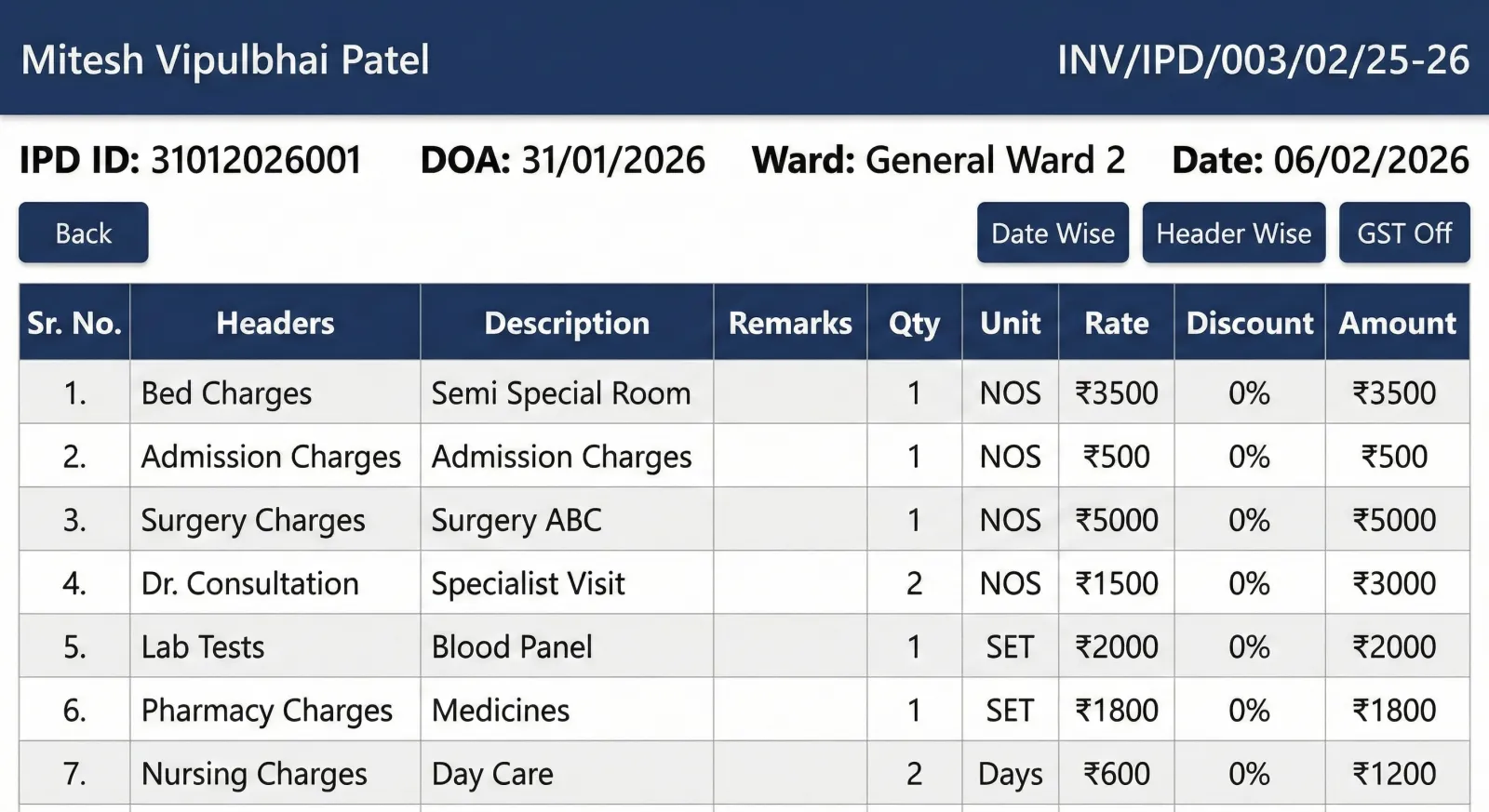
Lifemaan's billing module is a hospital-grade billing system for Indian clinics and hospitals. It produces GST-compliant invoices (GSTIN, HSN, tax breakdowns), supports TPA-based insurance billing with configurable TDS and tax calculation, and links the pharmacy bill to the IPD bill at discharge — pharmacy dues are highlighted on the discharge screen and discharge cannot be finalised until those dues are cleared. Used across 328+ hospitals in India.
Last updated: May 2026
Why Do Indian Hospitals Choose Lifemaan Billing?
No missed charges
Every consultation, test, procedure, and pharmacy item is captured in the patient bill — no missed charges, no leakage.
GST-compliant invoices
Proper tax invoices with GSTIN, HSN codes, and tax breakdowns — one-click generation, ready for audit.
TPA + insurance ready
Record the TPA panel against the patient, capture pre-authorisation and final-bill data, and generate the documents the TPA needs.
Financial clarity
Daily collections, outstanding dues, and doctor-wise / department-wise revenue reports — refreshed in real time.
How Does Hospital Billing Work in Lifemaan?
Charge Capture
Charges captured as services are delivered — OPD consultations, IPD bed days, procedures, lab tests, and pharmacy dispensing.
Generate Invoice
One-click GST-compliant invoice. Record payment in cash, card, UPI, or against an insurance / TPA panel.
Track & Report
Real-time dashboards for collections, outstanding dues, payer-wise revenue, and doctor / department revenue summaries.
What Are Lifemaan's Hospital Billing Features?
Linked Billing at Discharge
The IPD bill at discharge has the patient's pharmacy bill linked to it. Any pending pharmacy dues are highlighted on the discharge screen, and the discharge cannot be finalised until those dues are cleared.
GST Invoicing
Tax invoices with GSTIN, HSN, and tax breakdowns. Ready for GST filing and audit.
TPA + Insurance Billing
Record the TPA panel, capture pre-auth and final-bill data, and generate claim documents.
Multiple Payment Modes
Cash, card, UPI, NEFT, and insurance — all tracked against the patient bill in one place.
Outstanding Tracking
Pending payments visible at a glance. Send reminders, manage credit patients, and write off when needed.
Doctor-wise Revenue Reports
See how much each consultant has billed in a period — useful for revenue share and payouts.
Department-wise Revenue Reports
Track OPD, IPD, lab, pharmacy, and procedure revenue separately. Spot trends before they hurt cash flow.
Receipt + Invoice Printing
Professional receipts and invoices ready to print thermally or A4, or share digitally to patient WhatsApp.
Who Uses Lifemaan Billing?
Explore More
Hospital Management Software
Complete HMS with OPD, IPD, billing, ICU, pharmacy, and EMR in one platform.
Learn moreIPD Management
Bed allocation, treatment charts, discharge summaries — IPD charges flow straight to billing.
Learn moreOPD Management
Patient queues, consultations, and digital prescriptions — every OPD charge captured.
Learn morePharmacy Management Software
Standalone or hospital-linked pharmacy billing, stock, and expiry — pharmacy dues flow to the patient bill.
Learn moreFrequently Asked Questions
How Does Lifemaan Handle GST-Compliant Hospital Billing?
Indian hospital billing has a specific tax structure that differs from regular retail billing. Healthcare services rendered by a clinical establishment are largely exempt from GST, but specific items — pharmacy retail sales, certain consumables, cosmetic procedures, and packaged room categories above the specified threshold — attract GST at their applicable rates. The result is that a single patient's bill often mixes exempt clinical services, 5%-taxed pharmacy items, 12%-taxed consumables, and 18%-taxed cosmetic line items in the same invoice. Lifemaan's billing module handles this complexity natively so the billing counter does not have to think about per-line tax handling.
Each chargeable item in Lifemaan carries a tax setting: exempt, 5%, 12%, or 18%. The system attaches the correct HSN code, splits the tax into CGST and SGST for intra-state billing or applies IGST for inter-state billing, and prints the breakdown on the invoice. The hospital's GSTIN appears on the invoice header alongside the legal name and address, so the invoice is ready for the patient's reimbursement claim, the TPA file, or a corporate buyer's books.
The invoice register inside Lifemaan is exportable. Hospital accountants typically pull a month-end CSV with invoice number, date, patient name, taxable value, CGST, SGST, IGST, and total, and import it into their GST filing tool. Cancelled invoices and credit notes carry their own running number and remain in the register for audit traceability. The register is the same source of truth the external auditor reviews during the annual audit, the same source the GST consultant works off for the monthly return, and the same source the management team uses for the month-end revenue review. There is no parallel spreadsheet to maintain alongside.
How Multi-Mode Payment Settlement Works on a Single IPD Bill
A typical IPD discharge bill in an Indian mid-size hospital rarely settles on a single payment mode. A patient on a TPA panel might have ₹40,000 covered cashless by the insurer, ₹8,000 going as the patient co-pay, and a ₹2,000 advance paid in cash at admission that gets adjusted at discharge. The patient might pay half of the co-pay on UPI and the rest on card. A paper workflow loses track of which amount came from which mode against which bill section — a recurring source of reconciliation pain.
Lifemaan records every payment with the mode, the amount, the timestamp, and the user who recorded it, all against the same patient invoice. The cashless settlement from the TPA is booked when the cashless packet is approved; the cash advance from admission is adjusted automatically; the UPI and card amounts at discharge are recorded as separate payment entries. The outstanding view shows the bill as fully settled with the breakdown visible. The end-of-day cash reconciliation against the cash drawer matches what Lifemaan recorded; the merchant-side card settlement matches the card receipts; the UPI settlement matches the bank's daily UPI report. The accounts team is not chasing missing entries.
Where Hospital Revenue Leaks and What Lifemaan Closes
Revenue leakage in a typical Indian hospital is rarely one big hole; it is many small ones across departments. The common patterns are predictable.
Pharmacy items dispensed against an admitted patient but never booked to the bill because the manual handoff between pharmacy and billing was missed.
Pharmacy dispensing is recorded in the patient bill in the same step as stock decrement.
Procedure consumables used in OT but not captured against the case sheet.
Procedure consumables are attached to the case sheet in the OT module and appear on the bill automatically.
Doctor consultations during the admission that were noted in the case file but never billed at discharge.
Doctor consultations during an admission are logged against the admission so they cannot be missed at discharge.
Lab investigations ordered verbally and run informally without a billing entry.
Lab orders create a billing line when the test is run.
ICU transfers that were noted in the nursing handover but never updated in the billing module, so the patient continued to be billed at general ward rates.
ICU transfers update the billing module in the same one-click action that moves the patient on the Visual Bed Board.
Each of these patterns has the same underlying cause: the charge is captured in one system (or no system) and the bill lives somewhere else. Lifemaan closes the leakage by putting capture and billing on the same patient file.
The result is that the bill the hospital generates at discharge actually reflects the care delivered. The management is not chasing missing entries against a hand ledger; the billing counter is not reconciling with the pharmacy at the end of the day; the auditor is not finding gaps between the case sheet and the invoice.
How Does Insurance and TPA Billing Work in Lifemaan?
Most Indian hospitals work with multiple Third-Party Administrator (TPA) panels and direct insurer relationships. Lifemaan supports both cashless and reimbursement workflows out of the box.
At registration / admission
The patient's TPA panel is recorded at registration or at admission, along with the policy number, sum insured, and the patient's insurance ID.
Pre-authorisation
For planned admissions, the pre-authorisation data is captured in Lifemaan: the proposed diagnosis, treatment plan, estimated length of stay, and estimated bill amount. This information is packaged for the TPA in the format the TPA expects. Once authorisation comes back, the approved amount is recorded against the case and the admission proceeds.
At discharge
Lifemaan generates the final-bill packet that the TPA requires: itemised bill, discharge summary, investigation reports, and any consents. The billing counter records the cashless settlement against the patient invoice and books the balance (co-pay, non-covered items) to the patient directly. The TPA-wise outstanding report tracks unpaid claims so the collections team can follow up systematically.
How Does Multi-Department Billing Work in Lifemaan?
A typical admitted patient generates charges from many departments — OPD consultations before admission, daily IPD bed and nursing charges, ICU bed days if shifted, surgical procedure charges, anaesthesia charges, investigation charges from the lab, imaging charges, pharmacy dispensing for the duration of stay, and any consumables used. Without an integrated billing module, capturing each charge cleanly is the single biggest source of revenue leakage in Indian hospitals.
Lifemaan captures each charge at the source. The OPD counter books consultation charges as the patient is seen. The IPD module books bed and nursing charges automatically each day the patient is admitted, with ICU days picked up correctly when the patient is transferred to ICU. Operation Theatre charges are booked when the case is scheduled and finalised. Lab and imaging charges are booked when the investigation is ordered. The pharmacy module books dispensing against the patient account as medicines and consumables leave the store.
At discharge, the billing counter opens the IPD bill with each department's charges grouped under its own section — date, item, quantity, rate, and applicable tax. The patient's pharmacy bill is linked to the IPD bill on the same screen, with any pending pharmacy dues highlighted. The discharge cannot be finalised until those pharmacy dues are cleared, so the patient does not leave with an unsettled pharmacy balance. The department breakdown is preserved so the discharge bill is transparent to the patient, to the TPA reviewing the claim, and to the hospital's own audit team.
Role-based discount approvals
Discounts can be applied at the line level (a specific item) or at the bill level (a flat amount or a percentage off the subtotal), with role-based approval so that only authorised staff can grant large concessions. Every discount is logged against the user who applied it, which closes a common audit gap.
How a Billing Clerk Processes a Discharge Bill in Lifemaan
A walkthrough of how the billing module is used on a typical day, from admission charge capture to the final GST invoice handed to the patient at discharge:
- 1.Admission charge capture. When the patient is admitted through the IPD module, a billing file opens against the patient automatically. The ward type (general, semi-private, private) determines the bed rate that begins accruing from day one. Doctor visit charges, nursing charges, and any admission-time investigations are added the moment they happen. The billing clerk does not have to chase the ward for entries — the entries appear as the care is delivered.
- 2.Procedure billing. When a procedure or surgery is scheduled, the OT module attaches the procedure charges, the surgeon and anaesthesia line items, and any consumables used during the surgery. The case sheet from OT pushes the data into the patient bill so the patient's family can see an updated bill at the billing counter the same evening — useful when they want to plan the cash component ahead of discharge.
- 3.Pharmacy and consumables. Each medicine, syringe, IV set, and consumable dispensed from the hospital pharmacy is recorded against the patient by the pharmacy team at the point of dispense. The inventory stock register updates in the same step, so the pharmacy team is not running an end-of-day reconciliation to figure out what left the store and what was billed.
- 4.Investigation charges. Lab and imaging orders raised by the treating doctor are priced against the hospital's rate card and booked to the patient as the tests are completed. The lab and imaging teams sign off the result in their module; the charge flows into billing in the same action. There is no parallel paper requisition slip that has to be matched against the bill later.
- 5.Pre-discharge review. The billing clerk opens the IPD bill and reviews each section — doctor consultations, ward bed days, procedure charges, and investigation charges grouped by department. The linked pharmacy bill appears alongside with any pending dues highlighted; the discharge cannot be finalised until those pharmacy dues are settled. The clerk confirms any pending entries with the ward, applies approved discounts at line or bill level with the required sign-off, and the bill is ready for the final invoice step.
- 6.Final GST invoice. One click generates the final GST-compliant invoice with the tax breakdown computed per line. Payment is recorded against the bill — cash, card, UPI, or via TPA cashless, with part-payments supported across multiple modes. A printed copy is handed to the patient and a digital copy is sent to the patient's WhatsApp. The invoice enters the GST register for month-end filing.
What Changes When a TPA Panel Rejects a Claim
TPA claim rejections are a fact of life for any hospital running an insurance-heavy patient mix. The usual cause is a mismatch between the discharge summary and the billed line items, missing investigation reports in the claim packet, or a sum-insured shortfall that should have been caught at pre-authorisation.
In a paper-driven workflow
The rejection often surfaces three weeks after the patient has gone home — by which point reconstructing the bill, the discharge summary, and the supporting documents is a multi-day exercise across people who have moved on to other cases.
In Lifemaan
Lifemaan keeps the entire packet attached to the patient invoice. When a TPA rejection comes in, the collections team opens the patient's file, pulls up the original claim packet — itemised bill, discharge summary, investigation reports, consents — and compares it against the rejection reason. If the discharge summary needs an addendum, the consultant adds it without re-creating the document from scratch. If a missing investigation report is the issue, the lab module already has the file attached. The revised packet is regenerated and resubmitted.
The TPA-wise outstanding report tracks rejection-and-resubmission cycles by patient and by TPA panel, so the collections team is working from a live worklist rather than rediscovering claims at month-end.
What Financial Reports Does Lifemaan Provide?
Lifemaan ships with daily, weekly, and monthly financial reports built on the live billing data.
Daily collection report
Shows cash, card, UPI, and TPA settlements with the counter-wise breakdown.
Outstanding report
Lists patients and TPA panels with unpaid balances and ageing.
Doctor-wise revenue report
Shows how much each consultant has billed in a period, useful for revenue share and payouts.
Department-wise revenue report
Tracks OPD, IPD, lab, pharmacy, and procedure revenue separately so the management can spot trends before they hurt cash flow.
All reports refresh in real time and are exportable to Excel for the accounts team. Filters by date range, doctor, department, payer, and ward allow drilling into the numbers without writing custom queries.
How a Hospital Uses Doctor-Wise Revenue Reports for Consultant Payouts
Most Indian hospitals run a mix of full-time consultants on fixed salary and visiting consultants on revenue-share terms. The revenue-share calculation at month-end is one of the highest-friction operations in a paper-driven hospital: the accounts team has to identify which consultations and procedures each visiting consultant performed in the period, attribute the right share, and settle the payout. Disputes are common because the attribution depends on bills that were created across multiple departments and counters during the month.
Lifemaan's doctor-wise revenue report removes the manual attribution. Every consultation charge, every procedure charge, and every prescribed item is already tagged to the consultant who delivered the service when the line item was created.
Pulling the doctor-wise report for the month gives the accounts team the per-consultant revenue breakdown by department and by service category, ready to feed into the revenue-share calculation. The consultant's share is computed once against a clear number; disputes drop because the underlying data is the same data the consultant's own day-to-day work generated.
Discount Approvals and the Audit Trail
Discounts are a recurring source of audit gaps in Indian hospitals. A counter staff member who applies a ₹2,000 discount without a documented approval reason is common in paper-driven workflows; the management sees the discount at month-end and cannot trace who granted it or why. Lifemaan handles discounts at two levels — line item and full bill — with role-based approval so that only authorised staff can grant concessions beyond pre-configured limits. Every discount is logged against the user who applied it, with a free-text reason field for documentation and a timestamp. The management report shows the discount-versus-revenue ratio per counter, per consultant, and per period so trends are visible rather than buried.
Lifemaan Billing vs Spreadsheet Billing vs Generic Accounting Software
Many Indian clinics and small hospitals still run billing on spreadsheets or on a generic accounting package that was not built for healthcare. Both approaches break down as soon as volume, TPA panels, or pharmacy stock enter the picture.
| Capability | Lifemaan | Spreadsheet | Generic Accounting Software |
|---|---|---|---|
| Auto-capture from OPD/IPD/Pharmacy | Yes | No — manual | No — needs integration work |
| GST + HSN per healthcare item | Yes | Manual | Partial (no healthcare context) |
| TPA panel + claim documents | Yes | No | No |
| Doctor-wise revenue report | Yes | Manual | Custom report required |
| Linked to pharmacy stock | Yes | No | No |
| Patient WhatsApp invoice delivery | Yes | No | No |
The right way to think about this: a spreadsheet is fine for a single doctor seeing 10 patients a day with only cash collections. A generic accounting package is fine for booking the hospital's P&L at the end of the month. Neither replaces a healthcare-aware billing module that has to capture charges live from every department, attach the right tax, and produce a TPA-ready claim packet on demand. Lifemaan consolidates billing with IPD management, OPD management, and the broader hospital management platform so the numbers stay consistent end to end. For how billing fits alongside the other parts of the system, see our guide to the modules of a hospital management system. To see it on your data, book a free demo.