
Clinic Management Software for Doctors in India
Built for dental clinics, dermatology clinics, ENT practices, and single-doctor OPDs. Go fully digital without changing how you write prescriptions or see patients. Trusted by 328+ hospitals and clinics across India.
Lifemaan is clinic management software for Indian doctors and small clinics (1–5 doctors). It runs the OPD day end-to-end: tablet-written and voice-dictated prescriptions, WhatsApp delivery, GST-compliant billing, and ABDM-linked patient records. The 7-day free trial includes unlimited users, unlimited devices, and no credit card — most doctor profiles go live within 15 minutes.
Last updated: May 2026
What Sets Lifemaan Apart
For a 1–5 doctor clinic, the question is whether digital software actually sticks. Lifemaan is built around the two things that decide that: zero-friction input and one shared patient file.
Write like paper, go digital instantly
Doctors write on a tablet exactly as they would on paper and it is digitised in seconds — no typing and no templates to learn.
A voice scribe built into the record
Speech-to-Rx dictates prescriptions and clinical notes in 22 major Indian languages plus English and Hinglish, natively inside the EMR — not a separate app.
One connected platform
OPD and queue, GST billing, EMR, pharmacy (standalone retail and hospital-linked), hospital CRM, and inventory and asset management all read the same patient file.
Built in India, for Indian hospitals
An AI-powered hospital management system founded in Surat in April 2021, designed for Indian small, mid-size, and growing hospitals and clinics.
Proven at scale
328+ hospitals and clinics across India run on Lifemaan as of 2026.
Lifemaan by the numbers
- As of 2026, 328+ hospitals and clinics across India run on Lifemaan. (Source: Lifemaan)
- Doctors have digitised 2,00,000+ patient records on the Lifemaan platform. (Source: Lifemaan)
- Lifemaan has supported care for 1,00,000+ patients across India. (Source: Lifemaan)
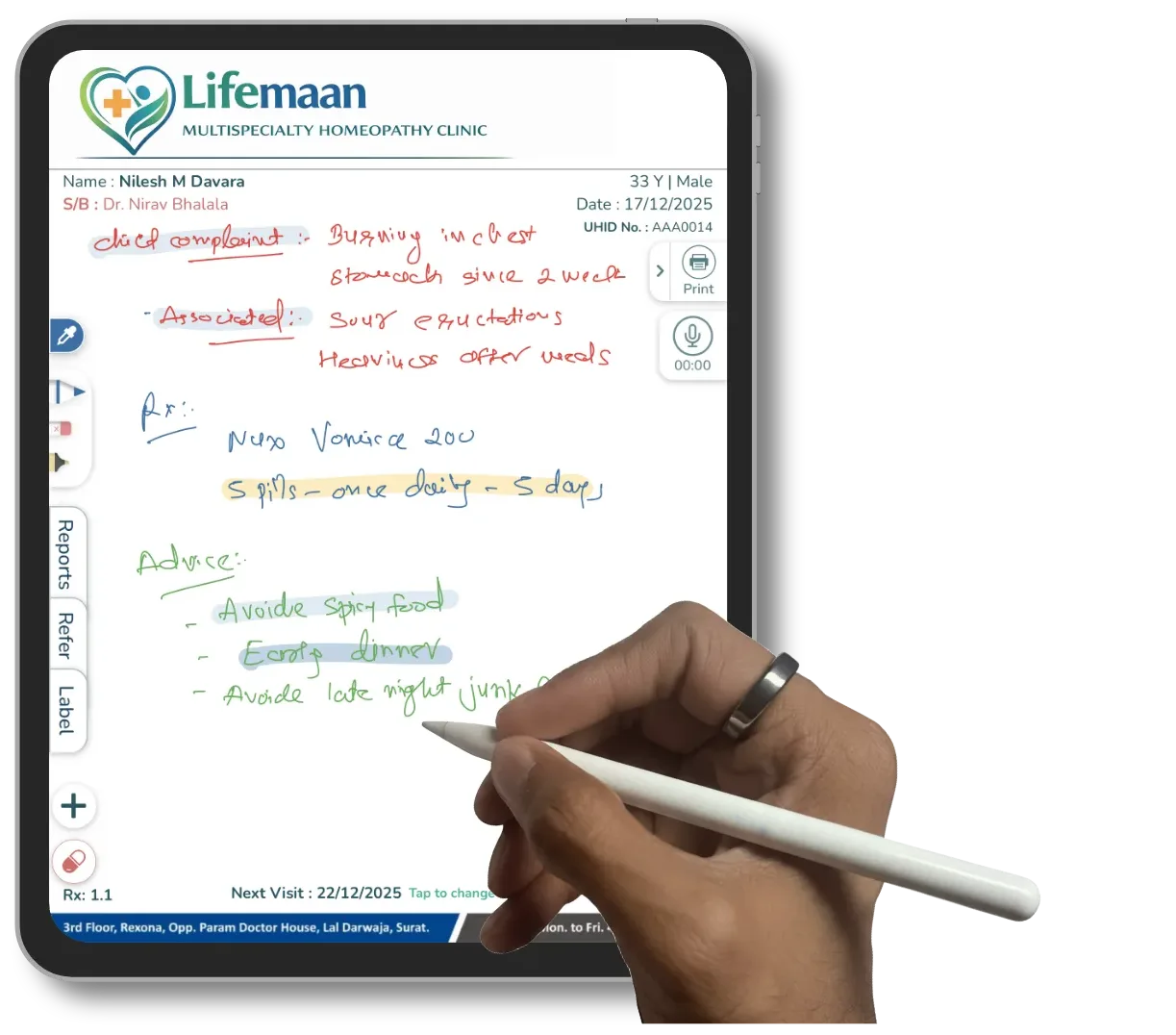
The Lifemaan clinic flow is built around two ideas that tend to determine whether a digital tool sticks in an Indian clinic.
The consultant never changes how they consult
Tablet writing and Speech-to-Rx serve the doctor at their natural consultation pace, without templates or typing in the way.
One patient file, visible across the whole clinic
Reception and billing counter see the same file the consultant sees — registration, consultation, billing, prescription delivery, and follow-up run on one continuous data layer rather than several disconnected notebooks.
Why Lifemaan for Clinics?
Built so the doctor never has to change how they work — only the paper goes away.
Write, Don't Type
Prescribe on a tablet just like paper — zero learning curve for busy doctors.
Go Live in a Day
Doctor-side go-live in 15 minutes per user; full clinic setup typically within a single day.
ABDM-Linked Records
Patient data is encrypted, backed up, and ABDM-linked for the national digital health ecosystem.
Why Indian Clinics Are Evaluating Lifemaan in 2026
The push toward digital records in Indian clinics is no longer optional in any meaningful sense. Four pressures are converging at once:
ABDM adoption widening
Providers across the country are onboarding — clinics still on paper are behind the curve.
WhatsApp prescription expectations
Patients increasingly expect their prescription on WhatsApp before they leave the clinic.
Insurance documentation
Insurance networks expect digital claim documentation — paper records slow down settlements.
GST compliance
GST-compliant billing has been the law for years. Notebook billing is a growing liability.
The evaluation question that comes up most often is whether the digital tool will slow the doctor down. That is the single thing that kills clinic-software rollouts: if the consultation takes longer on the new tool than it took on paper, the doctor quietly reverts to paper after the first busy week. Lifemaan's design choice is to keep the consultation on the doctor's native pace — tablet writing preserves the handwriting and the format the doctor already uses, Speech-to-Rx accepts the language mix the doctor already speaks in, and the patient receives the prescription on WhatsApp by the time they leave the room. The doctor is not asked to slow down for the tool; the tool is asked to match the doctor's pace.
What Problems Does Lifemaan Solve for an Indian Clinic?
Most Indian clinics still juggle three or four separate systems for what should be one workflow.
Without Lifemaan
- ✗Appointments in a paper diary or WhatsApp chat
- ✗Prescriptions handwritten and easily lost by the patient
- ✗Bills on a notebook or generic app — wrong GST, entered manually
- ✗Patient history reconstructed from memory or a thin paper file
- ✗Owner's operational picture assembled from notebooks at month-end
With Lifemaan
- ✓Appointments in Lifemaan — patient receives WhatsApp reminder
- ✓Prescription on tablet, on patient's WhatsApp before they leave
- ✓GST-compliant bill generated in one click, automatically
- ✓Full patient history one tap away at the next visit
- ✓Daily report: patients seen, collections, follow-ups, outstanding — live
How a 2-Doctor Clinic Uses Lifemaan in a Typical Day
A walkthrough of an OPD day at a typical 2-doctor clinic running on Lifemaan:
- 1.8:30 AM — Pre-OPD prep. The reception desk opens the day's OPD list on Lifemaan and sees both consultants' queues on one screen. Each scheduled patient has already received a WhatsApp reminder the previous day, so no-shows are down from the paper-diary baseline. Walk-ins are added to the live queue as they arrive and slotted into whichever consultant is free.
- 2.9:00 AM — First patient. The patient is checked in. Their past file, last prescription, allergies, and any pending follow-up notes appear on the doctor's tablet the moment the consultant taps the patient's name in the queue. The doctor writes the new prescription with the stylus just as on paper — diagnosis, medicines, dosages, instructions, any anatomical marking — and saves it without breaking the conversation with the patient.
- 3.9:05 AM — Billing. The patient moves to the billing counter. The consultation charge is already on the bill because the consultant's session created the line item when the prescription was saved. One click generates the GST-compliant invoice. Payment is recorded in cash, card, or UPI. The invoice and the prescription both go to the patient's WhatsApp before they leave the clinic.
- 4.10:30 AM — Speech-to-Rx for a complex case. A patient with multiple complaints walks in. The doctor uses Speech-to-Rx to dictate the long list of medicines in Hinglish — drug names in English, dosing instructions in Hindi — and the AI structures the output into the prescription. The doctor reviews, tweaks one dose, signs at the bottom on the tablet, and saves.
- 5.1:00 PM — Quick break. The doctor opens the dashboard from a phone and sees the morning summary: the number of patients seen so far, the day's collections so far across cash, card, and UPI, the follow-ups scheduled for next week, and any outstanding payments from earlier visits that came due today. No spreadsheet to reconstruct.
- 6.7:00 PM — Closing. The reception runs the end-of-day report. Outstanding payments are listed for follow-up, the next day's appointments are confirmed with WhatsApp reminders going out automatically, and the day's revenue is reconciled against the cash drawer in minutes rather than the hour the paper diary used to take.
What the Clinic Owner Sees
For the consulting doctor, the value of Lifemaan is mostly in the consultation flow. For the clinic owner, the value is in the visibility that simply was not there with paper — refreshing in real time off live billing data, with no end-of-month exercise to reconstruct numbers from a notebook.
Patients per consultant
How many patients each consultant saw this week — at a glance, not reconstructed from a diary.
Collection breakdown
Day's collections split across cash, card, and UPI. Updates live as payments are recorded.
Follow-ups pending
Patients due for recall who have not booked yet — with WhatsApp reminders going out automatically.
Outstanding payments
Payments still pending from earlier visits — tracked automatically, not rediscovered at month-end.
For a clinic owner who is also a practising consultant, this matters because the time spent reconciling paper at month-end was time not spent on patients. For a clinic owner who is not a doctor — a spouse running the business side of a single-doctor practice, or a manager running a small group — this matters because the operational picture is now legible without the doctor having to explain it.
How a 4-Doctor Clinic Shares the Patient File
A 4-doctor general clinic — typical in a tier-2 city in India — has a different operational shape from a single-doctor practice. Patients tend to see whichever consultant is available rather than maintaining loyalty to one. The same patient might be seen by Dr A this month, Dr B next month, and Dr C for a follow-up on a chronic condition. On paper, this is where care continuity breaks down — Dr C does not have time to dig out the file Dr A wrote on six weeks ago.
In Lifemaan, the patient file is shared across the four consultants. When Dr C opens the patient, the file shows every past visit chronologically — Dr A's consultation notes from six weeks ago, the prescription that was written, Dr B's follow-up note from three weeks ago, and the lab investigation that was attached in between. Dr C does not have to ask the patient what was tried last time. The continuity is automatic; the doctor just has to read.
For the clinic owner, the same shared file makes revenue-share between consultants straightforward. The doctor-wise revenue report shows how much each consultant generated in the period — used to settle revenue share for visiting consultants and to evaluate the business contribution of each chair.
What the First Week on Lifemaan Looks Like
Go live with real patients
Doctor profile created, consulting room tablet set up. The doctor writes the first real-patient prescription within the first session. Reception shown the registration flow and the day's queue. Clinic runs paper and Lifemaan in parallel for any comfort the staff need.
Paper backup falls away
The digital flow is faster than re-writing on paper. Staff who kept a paper backup typically stop within the first two days — not because they're told to, but because the digital route is quicker.
Clinic-specific tweaks
Preferred prescription headers, exact wording on follow-up reminders, GST configuration if not finalised on day one — these surface naturally as the clinic uses the product on real patients.
Operational rhythm shifted
The clinic's operational rhythm has moved onto Lifemaan. The Monday after week one looks qualitatively different from the previous Monday on paper.
Trying Lifemaan as a Clinic
7-day free trial — built for real patient use
Unlimited users
All staff from day one
Unlimited devices
Tablet, desktop, phone
No credit card
Start without committing
- ✓Write real prescriptions on real patients during the trial week
- ✓Book appointments and generate GST invoices — full product, no feature caps
- ✓No per-prescription charge on paid plans — unlimited writes
- ✓Doctor-side go-live in 15 minutes; full clinic setup within a day
For a written quote tailored to your clinic, contact us or call +91 90237 53539.
How Lifemaan Helps Clinics Retain Patients
Patient retention in an Indian clinic depends less on marketing and more on three operational details that paper workflows struggle with.
Previous prescription at next visit
The consultant sees every past prescription the moment they open the patient file — without having to ask the patient what they were taking last time.
Follow-up reminder goes out
Recall reminders are scheduled when the prescription is saved and sent to the patient's WhatsApp per the consultant's preferred interval — automatically, without the reception maintaining a separate list.
Prescription on WhatsApp
Paper prescriptions get lost. App portals require sign-in. WhatsApp prescriptions stay in the chat the patient already checks daily.
The retention metrics — return visit rate, follow-up compliance, vaccination recall rate for paediatric patients — tend to improve quietly because the underlying operational picture has tightened.
Tablet Writing and Speech-to-Rx for Clinic Doctors
Clinic doctors usually do not have time for typing. The two most-used Lifemaan inputs for clinics are tablet writing (stylus on iPad or Samsung tablet) and Speech-to-Rx (voice dictation in all 22 major Indian languages plus English and Hinglish). Computer-based typing with template selection is also available for doctors who prefer the keyboard. Most doctors mix methods on the same Rx — dictate the medicine list, hand-draw the anatomical marking, sign at the bottom.
Diagrams matter for dental, dermatology, ENT, and orthopedic clinics. The stylus on the tablet captures the diagram inline with the prescription — the same way the doctor used to draw on a paper pad. No template forces the diagram into a fixed shape.
The same prescription is also available for the patient on WhatsApp the moment it's saved. The patient never has to ask for a clearer copy, and the next clinic that sees the patient can open the prescription directly.
How Different Speciality Clinics Use Lifemaan Differently
No two specialities document a consultation the same way. A physician's prescription looks nothing like a surgeon's operative note, and a gynaecologist's follow-up chart is different from a dentist's procedure record. Lifemaan is built around this reality — the tablet writing interface lets any specialist work on their own custom forms, mark anatomical diagrams, and share patient-education images over WhatsApp, all from the same platform. The speciality shapes the workflow; Lifemaan adapts to it.
Here is how five different specialists use the same platform in five different ways:
- General Surgeon — while counselling a hernia patient, the surgeon opens an abdominal anatomy diagram on the tablet, marks the affected region, and annotates the grade of the defect. The patient sees exactly where the problem is before consenting to the procedure; the marked image is sent to the patient's WhatsApp for reference at home.
- Gynaecologist — at a 20-week follow-up, the doctor pulls up a foetal growth chart on the same tablet, marks the current week, annotates the baby's position, and explains the scan findings on the diagram. The mother leaves with a personalised chart on WhatsApp rather than a verbal summary she may not remember accurately.
- Dentist — the prescription includes a teeth diagram with the affected tooth highlighted, the procedure performed annotated directly on the chart, and the recall date noted below. The next visit opens the same chart for comparison — no separate scanned attachment, no two files to reconcile.
- Dermatologist — a skin cross-section diagram shows the patient which layer is involved in their condition and why a topical cream reaches only so deep. The prescription includes the diagram alongside the medicine list, so the patient understands the treatment logic and is more likely to follow through.
- Orthopaedic Surgeon — a joint diagram with the affected cartilage shaded explains the grade of arthritis better than a verbal description. For a post-operative patient, the surgeon marks the hardware placement on a bone diagram; the physiotherapist in the next room sees the same annotated image in the shared patient file.
- Paediatrician — growth charts, vaccination schedules, and milestone checklists are pre-loaded as templates. The doctor marks the child's current percentile on the chart, flags any deviation, and sends the updated chart to the parents over WhatsApp — removing the need for parents to interpret raw numbers on a printed report.
The same Lifemaan tenant that runs a general OPD runs any of these specialty workflows without forcing a specialist to work around a generalist interface. Custom forms, anatomy images, and procedure packages are configured once per speciality — everything else stays the same.
What Changes When a Clinic Grows Into a Nursing Home
A clinic that adds a daycare bed or two — and eventually becomes a small nursing home — usually hits a wall with clinic-only tools. The OPD workflow that worked fine while the practice was outpatient-only does not extend to admissions, ward management, or longer-stay billing. Switching tools at this stage means migrating active patient files, re-training reception, and re-doing the doctor profiles in the new system. It is rarely a small project.
Lifemaan covers the OPD-to-IPD transition without a tool switch. The same patient file the consultant has been writing prescriptions against in OPD becomes the admission file the moment the patient is admitted. The IPD module handles bed allocation via the Visual Bed Board, the consultant continues to write progress notes on the tablet, and the billing module consolidates OPD and IPD charges on the discharge bill. The clinic grows into a nursing home on the same Lifemaan tenant — same staff, same workflow, additional modules turned on.
For a clinic owner planning a growth path, this matters because the tool choice made at the clinic stage does not have to be re-evaluated at the nursing-home stage. The data, the patient history, the consultant profiles, and the reception's habits all carry over.
Lifemaan vs Clinic-Only Software vs Spreadsheet Workflow
Indian clinics typically evaluate three paths: stay on a manual spreadsheet and paper pad, adopt a clinic-only tool that handles OPD appointments and basic billing but stops there — no IPD, no pharmacy, no lab — or use Lifemaan, which covers the full clinic workflow today and grows with the practice into hospital scope without a tool switch.
| Capability | Lifemaan | Clinic-Only Tool | Spreadsheet + Paper |
|---|---|---|---|
| Tablet writing (stylus) | Yes | No | Paper only |
| Speech-to-Rx (22 Indian languages) | Yes | No | No |
| GST-compliant invoicing | Yes | Partial | Manual |
| Pharmacy module | Yes (basic + advanced) | Partial | No |
| IPD when you grow | Yes | No | No |
| ABDM-linked records | Yes | Partial | No |
| Free trial | 7 days, unlimited users, no card | Varies by vendor | N/A |
The honest take: a spreadsheet is fine if the clinic is single-doctor, low-volume, and cash-only. A clinic-only tool covers OPD workflow but caps out the moment the practice adds a pharmacy counter or a daycare bed. Lifemaan covers the full clinic workflow plus pharmacy today, and the same data extends into IPD if the clinic grows into a nursing home or small hospital later.
How Patient WhatsApp Engagement Actually Works in a Clinic
WhatsApp is the default communication channel between Indian clinics and their patients — far more so than email or any patient app. Lifemaan integrates it directly into the patient file so the channel is structured, not fragmented.
Prescription delivery
Digital copy goes to the patient's registered WhatsApp — no app to download, no portal to sign into. Visible in their usual chat before they leave the room.
Appointment reminder
Scheduled patients receive a WhatsApp reminder automatically. No-shows come down without the reception making manual calls.
Follow-up & recall
Patients due for recall get a WhatsApp reminder per the consultant's preference — paediatric vaccination, dermatology follow-up, dental recall.
If the patient walks to a pharmacy without the clinic's digital system, they show the WhatsApp prescription. If they consult another doctor for a second opinion, the same prescription forwards in one tap. The clinic's data leaves the clinic in a format that is genuinely useful to the patient.
Everything Your Clinic Needs in One Platform
What the Reception Workflow Looks Like
In most Indian clinics the reception is the information hub — every patient interaction starts and ends there. On paper, this means five separate notebooks. In Lifemaan, one screen replaces all of them.
- 1Register — New patient registered in seconds — WhatsApp number is the primary identifier, so all future reminders are reachable from day one.
- 2Book & remind — Appointments visible in calendar form with walk-ins in one queue. WhatsApp reminder goes out to the patient the previous evening automatically.
- 3Check in — Patient checked in to the consultant's live queue as they arrive — the consultant sees the queue update in real time on the tablet.
- 4Bill — After the consultation, the bill is generated with the consultation charge already populated from the prescription save. One click.
- 5Collect — Payment recorded in cash, card, or UPI. Invoice and prescription go to the patient's WhatsApp automatically.
- 6Close day — End-of-day collection report — cash, card, UPI, and outstanding — reconciled against the cash drawer in minutes, not an hour.
The follow-up workflow is automatic. Patients due for a recall visit appear on a follow-up list with the WhatsApp reminder going out per the consultant's preference. The reception is not maintaining a parallel paper list; the schedule comes from the patient files directly.
Related Reading
- Practice Management Software — built specifically for solo doctors and 2–5 doctor practices.
- Speech-to-Rx — voice dictation in all 22 major Indian languages plus English and Hinglish.
- Tablet Writing — write prescriptions on iPad or Samsung tablet with a stylus.
What an ABDM Compliant Clinic Looks Like
The Ayushman Bharat Digital Mission has shifted from an option to an expectation for most Indian clinics in 2026. Patients increasingly arrive with an ABHA number and expect their records to flow into the national digital health ecosystem. Being ABDM compliant operationally means two things:
1. ABHA captured at registration
The patient's ABHA number is captured and linked to their file inside Lifemaan during registration — without any separate onboarding step for the clinic.
2. Records structured to flow through ABDM
Prescriptions, investigation reports, and discharge summaries are stored in an ABDM-compatible format. The consent flow is patient-driven — the clinic sees consent state inside Lifemaan before any external sharing happens.
For clinics that are not yet ready to onboard onto ABDM, the records remain a complete digital patient file inside Lifemaan. The ABDM linkage can be turned on later without re-creating the records — the patient files that were built in non-ABDM mode are the same files that flow once linkage is enabled.
What Changes in a Clinic After 30 Days on Lifemaan
None of these changes require the consultant to change how they consult; they happen because the operational layer tightened up around the consultation. Patient retention improves quietly because the follow-up reminders go out automatically. The patient experience improves quietly because the prescription is on WhatsApp by the time they leave the clinic.
Clinic Billing: Consultation Fees, Procedures and GST
Billing is usually the first thing a clinic owner asks about, and usually the thing a paper practice loses most money on — not through theft, but because a handwritten receipt book makes small gaps invisible. A dressing that was done but not charged, a follow-up billed at full rate by mistake, a balance nobody remembered. None of these are large individually and all of them are invisible at month-end.
Consultation fees, set per doctor
Each doctor in the clinic has their own fee structure — first visit, follow-up, and the window inside which a review is free or discounted. When reception registers the patient against a doctor, the right fee is already on the visit. A follow-up inside the review period is applied without anyone having to remember the rule or check a date by hand.
Procedure-wise billing
Dressings, injections, minor procedures, dental treatments, cautery, biopsies — each is a priced item rather than a number the doctor tells reception on the way out. When a procedure is added during the consultation it lands on the bill directly. For a dental or dermatology practice where treatment plans run across several sittings, each sitting bills against the plan so the patient and the clinic agree on what is paid and what remains.
GST invoices with sequential numbering
Invoices carry your clinic's GSTIN, per-line-item tax treatment and a system-generated sequential number. Because the numbering is not coming from a physical book, month-end reconciliation stops depending on whether every counterfoil survived. Your accountant can check the figures against the daily reports rather than taking them on trust. See billing and accounting for the full module.
Daily collection, without asking anyone
At close of day the clinic sees one figure: total collected, split by payment mode, with patient count and doctor-wise breakdown behind it. For an owner who is also a practising doctor, this is the report that replaces trusting a verbal summary at the end of a long OPD. Outstanding balances stay attached to the patient and surface the next time they are registered.
What to Look For in a Clinic Management System
Most clinic software comparisons are feature checklists, and feature checklists are close to useless here because every vendor ticks every box. These are the questions that actually separate systems once a clinic is using one daily. They are worth asking of any vendor, including us.
How does the doctor enter the prescription — and does it require typing?
This is the single question that decides whether a clinic actually goes digital or quietly reverts to paper. If the system needs the doctor to type, a busy consultant will keep writing on paper and have someone enter it later, which leaves you with a record that is a day old and second-hand. Ask to see the doctor's input method, not the admin dashboard.
Can the receptionist run it unaided by the second day?
Registration, finding a returning patient, and printing a bill are done hundreds of times a week. If those take more than a few taps each, the cost lands on your front desk every single day. Watch a receptionist — not a salesperson — do a registration during the demo.
Does the prescription reach the patient without them installing anything?
Any system that requires the patient to download an app and create a login has effectively not delivered the prescription. WhatsApp delivery works because your patients already have it open.
Is the record structured, or is it an image?
A scanned or photographed prescription is storage, not data. You cannot search it, report on it, or share it through ABDM. Ask whether medicine, strength, frequency and duration are held as separate fields.
Which ABDM milestones does the vendor actually hold?
ABDM certification is milestone-based rather than pass/fail — M1 is ABHA creation, M2 is consent-based record sharing, M3 is retrieving records held elsewhere. A vendor certified at M1 alone can still write "ABDM compliant" on a feature list, so ask which milestones. Lifemaan is certified by the National Health Authority across M1, M2 and M3.
Is there a per-prescription or per-page charge?
Some vendors price per prescription or per printed page, which means your software bill grows with your patient volume — you pay more precisely when you are busiest. Ask for the pricing model in writing, not just the monthly figure.
What happens to your data if you leave?
Ask directly how you export your patient records and in what format, and get the answer before you sign rather than when you want to move. A vendor who is comfortable with this question is telling you something useful.
Does it still fit if you add a second doctor or a daycare bed?
Clinics grow in small steps. A tool that caps out at one doctor means a migration in two years. Ask whether the same product handles a second consultant, and what changes if you add an observation bed.
If you want the same questions applied to specific named vendors, our comparison of hospital and clinic management software in India works through them vendor by vendor.
Frequently Asked Questions
Planning Capacity and Consultant Schedules
For a clinic owner planning consultant schedules ahead, the operational data Lifemaan accumulates becomes the input for capacity decisions — answered by the same appointment and consultation data the day-to-day workflow generates, rather than by intuition or a month-end manual count.
Which days are over-subscribed?
See which consultants hit capacity and which time slots are routinely full — by reading data, not intuition.
Which slots are underused?
Identify time slots that could be opened to walk-ins or returning patients to improve chair utilisation.
Which specialty is growing?
Track which consultation types are increasing — and whether a new visiting consultant's chair is justified.
The decisions on consultant schedules, recall intervals, and walk-in slots become data-driven without anyone running a separate analytics project.
“My patients love getting prescriptions on WhatsApp. It's professional, instant, and they don't lose it.”
Doctors rate Lifemaan 4.8 out of 5 on Google.
Start Your 7-Day Free Trial
Unlimited users, unlimited devices, no credit card. See how Lifemaan fits your clinic on real patients.
Book Free Demo