
Complete Hospital Management System for India
Book a 15-minute demo — see your whole hospital in one platform.
A hospital management system (HMS) is an integrated software platform that manages all hospital operations — from patient registration to discharge. Lifemaan's HMS covers OPD, IPD, ICU, billing, patient records, and digital prescriptions, built specifically for Indian hospitals of all sizes. Used by 328+ hospitals across India, Lifemaan stands out with tablet writing, speech-to-Rx, and a zero per-prescription cost model.
Last updated: June 2026
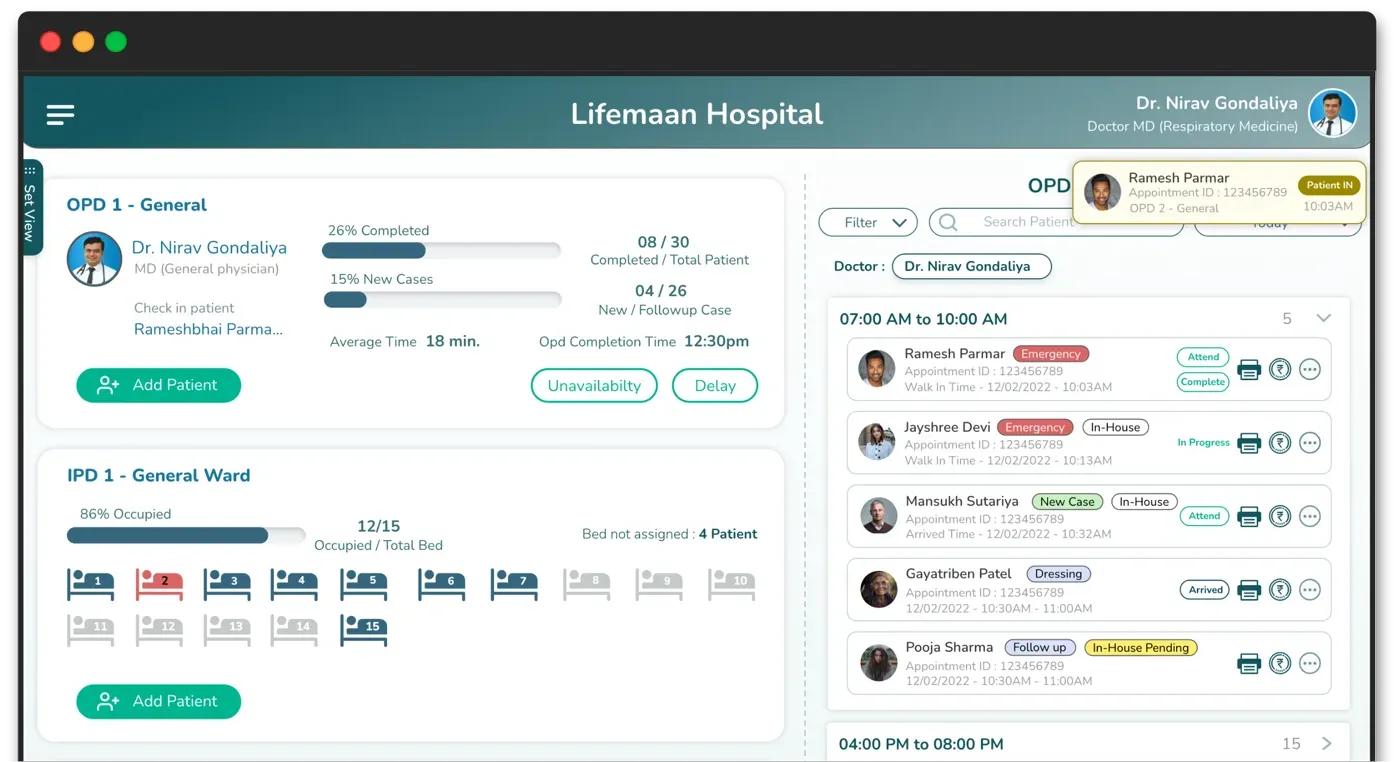
What is a Hospital Management System?
A hospital management system (HMS) is an integrated software platform that connects every department in a hospital — OPD, IPD, ICU, billing, pharmacy, patient records, and administration — into a single unified workflow. Unlike standalone software tools that handle one function at a time, an HMS ensures that data flows automatically between departments without manual re-entry or synchronisation.
For example, when a doctor admits a patient from OPD, the IPD module automatically picks up the patient record, assigns a bed, and starts a treatment chart. When treatment is complete, the billing module pulls in every charge — bed days, medications, procedures — and generates an accurate invoice. This level of integration is what separates a hospital management system from standalone hospital management software.
Standalone billing software, EMR tools, or appointment schedulers solve individual problems but create data silos. Hospitals end up entering the same patient data in three or four different places. An HMS eliminates this by acting as the central nervous system of your hospital — one entry, used everywhere.
If you are evaluating options, see our detailed breakdown of hospital management software features and pricing for a product-focused comparison.
HIS is the broader term that covers clinical, administrative, and financial information across every department under one platform — see our Hospital Information System page for the HIS view.
What is the Difference Between Hospital Management Software and a Hospital Management System?
The terms “hospital management software” and “hospital management system” are often used interchangeably, but there is a practical difference. Hospital management software typically refers to a specific tool or application — for example, billing software or appointment scheduling software. A hospital management system, on the other hand, is an integrated platform that connects all these tools into a single unified workflow.
Think of it this way: individual software handles one task well, while a system ensures that all tasks work together. When a doctor writes a prescription in Lifemaan, the patient record updates automatically, the billing module logs the consultation charge, and the patient receives the Rx via WhatsApp — all without manual re-entry. This is the advantage of a true system over standalone software.
For a detailed look at features and pricing of individual modules, see our hospital management software page. For patient-specific workflows, explore our patient management system overview.
Looking for something specific?
Most hospitals come to us with one problem first. Start there — you can see the rest in the demo.
What Modules Does a Hospital Management System Include?
A complete HMS connects multiple modules so that patient data, billing, and clinical workflows move seamlessly across departments. For a deeper walkthrough, read our guide to hospital management system modules explained. Here are the core modules in Lifemaan's hospital management system:
OPD Module
Manage outpatient registration, token queue, appointment scheduling, and consultation workflow from a single screen.
Learn moreIPD Module
Complete inpatient management — bed allocation, treatment charts, progress notes, and auto-generated discharge summaries.
Learn moreICU Module
Real-time vitals monitoring, ventilator data logging, auto progress sheets, and critical care documentation.
Learn moreBilling Module
Automated billing for OPD, IPD, and procedures with GST invoices, payment tracking, and financial reports.
Learn morePatient Records
Unlimited patient database with complete medical history, visit records, reports, and WhatsApp engagement.
Learn morePrescription Module
Write prescriptions naturally on a tablet — no typing, no habit change. Digital prescriptions that feel like paper.
Learn moreSpeech-to-Rx
Dictate prescriptions and clinical notes. AI converts your voice to structured digital records instantly.
Learn moreHow to Choose a Hospital Management System
Not every HMS is the right fit for your hospital. Use this checklist to evaluate systems before making a decision:
Cloud vs on-premise
Cloud-based systems need no server, no IT team, and work from any device. On-premise requires hardware investment and maintenance.
India compliance (GST, ABDM, ABHA)
Ensure the system supports GST billing, ABDM integration, and ABHA health ID — essential for Indian hospitals.
Training required
The less training needed, the faster your staff adopts the system. Look for intuitive interfaces that doctors can use in minutes.
Modules included
Verify that OPD, IPD, billing, patient records, and pharmacy are included — not sold as expensive add-ons.
Mobile and tablet support
Doctors and nurses move between wards. The system should work on tablets and phones, not just desktop computers.
Pricing transparency
Avoid vendors with hidden costs. Look for clear pricing with no per-user or per-module surprises.
Vendor support and updates
Choose a vendor that provides ongoing support, regular updates, and is responsive when you need help.
Which Hospital Management System Fits Your Hospital Size?
Different hospital sizes have different needs. Lifemaan scales from single-doctor clinics to multi-speciality hospitals — here is how each solution fits:
Small Clinic
Single-doctor practices, dental clinics, skin clinics, and OPD-only setups. Go paperless without changing how you work.
Learn moreMedium Hospital (50-200 beds)
Full OPD + IPD management for surgery, orthopaedic, gynaecology, and physician hospitals with integrated billing.
Learn moreMulti-Speciality Hospital
Manage multiple departments, multiple doctors, and complete hospital operations across specialities in one platform.
Learn moreHow Does Lifemaan Compare to Other Hospital Management Systems?
If you are evaluating Lifemaan against an established hospital management system, the most useful starting point is a side-by-side comparison. DocPulse currently ranks #1 on Google India for “hospital management system” — our fact-checked comparison covers features, AI capabilities, ABDM coverage, and pricing transparency.
See the full Lifemaan vs DocPulse comparison →
For a wider shortlist, see our roundup of the best hospital management software in India, which compares 10 leading platforms side by side.
Explore the Modules
Lifemaan's HMS is modular — each part is a full capability in its own right, all sharing one patient record and one source of truth.
Pharmacy Management Software
Standalone or hospital-linked pharmacy — billing, stock, expiry, and Rx reconciliation.
Inventory & Asset Management
Real-time stock, expiry alerts, department indents, and asset tracking.
Hospital ERP Software
Billing, inventory, pharmacy, and finance unified with the clinical side.
Hospital CRM Software
Capture enquiries and automate patient follow-ups, recalls, and reminders.
Queue Management System
Smart OPD queue ordering — walk-in, appointment, or AI-based.
Patient Management System
One connected patient record across registration, history, and billing.
Trusted by doctors and hospitals across India
“This is the best app for busy doctors like me. Writing on Tablet is so effortless, I am 100% satisfied with Lifemaan's platform.”

Dr. Nirav Satasiya
MS (General Surgery), Satasiya Surgical Hospital, Junagadh
“I tried other typing-based software and after 3-4 days I dropped it. Since I started using Lifemaan, writing on Tablet is same as writing on Paper. I have no reason to go back to paper system.”

Dr. Bhavinkant Chaudhari
MD Physician (Internal Medicine), Bardoli, Surat
“My patients love getting prescriptions on WhatsApp. It's professional, instant, and they don't lose it.”

Dr. Nirav Gondaliya
MD Physician, IDCC Hospital, Surat
How Lifemaan Compares as a Hospital Management System
| Feature | LLifemaan | Others (DocPulse, Medinous, etc.) |
|---|---|---|
| All modules integrated | Yes — single connected platform | Often separate modules with manual sync |
| Tablet writing prescriptions | Yes — write like paper with stylus | Not available (typing-only interfaces) |
| Cloud-based access | Yes — any device, anywhere | Varies (some on-premise only) |
| ABDM compliant | Yes — built-in support | Limited or planned for future |
| Implementation time | Days, not months | Weeks to months typical |
| Training required | 15 minutes | Days to weeks of staff training |
| Mobile/tablet support | Yes — Tablet-first design | Primarily desktop-based |
All modules integrated
Yes — single connected platform
Often separate modules with manual sync
Tablet writing prescriptions
Yes — write like paper with stylus
Not available (typing-only interfaces)
Cloud-based access
Yes — any device, anywhere
Varies (some on-premise only)
ABDM compliant
Yes — built-in support
Limited or planned for future
Implementation time
Days, not months
Weeks to months typical
Training required
15 minutes
Days to weeks of staff training
Mobile/tablet support
Yes — Tablet-first design
Primarily desktop-based
Frequently Asked Questions
See Lifemaan in Action
15-minute personalized walkthrough. We show you exactly how it works for your practice.
Or reach us directly: +91 90237 53539 · WhatsApp